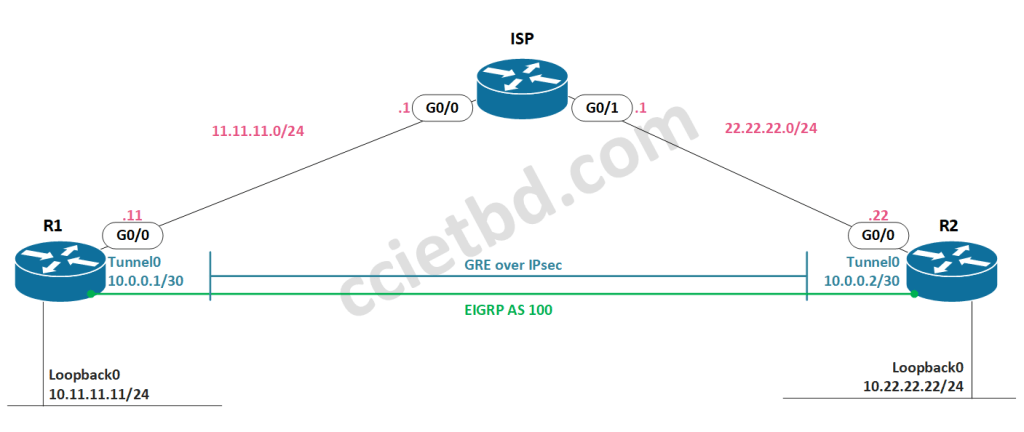
This article will look at a basic configuration for a route-based VPN between two Cisco IOS routers, using IKEv1 and IPsec for tunnel protection, and EIGRP for dynamic route advertisements based on the above topology.
Workflow:
- Verify basic routing and reachability
- Create and configure:
- LAN networks
- Tunnel interface
- EIGRP process
- Verify basic GRE tunnel status and reachability
- Create and configure:
- IKEv1 phase 1 policy
- IKEv1 phase 1 PSK and authorized peer
- IKEv1 phase 2 policy (transform set)
- IKEv1 phase 2 profile
- Apply IPsec profile to tunnel interface
- Verify encrypted tunnel state and operation
The relevant configuration of the ISP router is as follows, which just provides basic routed connectivity between R1 and R2, with no NAT configured or any information about RFC1918 addresses:
interface GigabitEthernet0/0
 ip address 11.11.11.1 255.255.255.0
!
interface GigabitEthernet0/1
 ip address 22.22.22.1 255.255.255.0
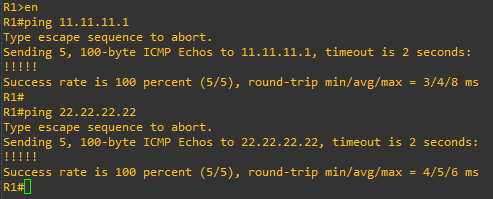
Both R1 and R2 have a static 0.0.0.0/0 route pointing to the IP of the connected interfaces on the ISP router – we should be able to ping our default gateway as well as the outside IP of the remote router:

Now, we can start building our configuration. Let’s first configure our LAN network, Lo0 in this case, along with our Tunnel0 interface and the EIGRP process.
!R1
!
interface Loopback0
 ip address 10.11.11.11 255.255.255.0
!
interface Tunnel0
 ip address 10.0.0.1 255.255.255.252
 tunnel source GigabitEthernet0/0
 tunnel mode gre ip
 tunnel destination 22.22.22.22
!
router eigrp 100
 network 10.0.0.0 0.0.0.3
 network 10.11.11.0 0.0.0.255
 passive-interface default
no passive-interface Tunnel0!R2
!
interface Loopback0
ip address 10.22.22.22 255.255.255.0
!
interface Tunnel0
ip address 10.0.0.2 255.255.255.252
tunnel source GigabitEthernet0/0
tunnel mode gre ip
tunnel destination 11.11.11.11
!
router eigrp 100
network 10.0.0.0 0.0.0.3
network 10.22.22.0 0.0.0.255
passive-interface default
no passive-interface Tunnel0Now let’s see if our basic GREoIP tunnel is up/up and check that EIGRP has formed an adjacency across the tunnel:
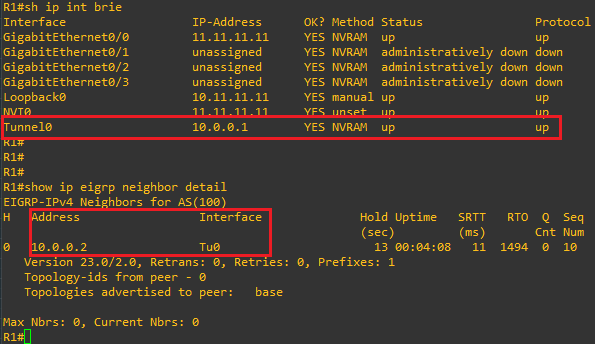
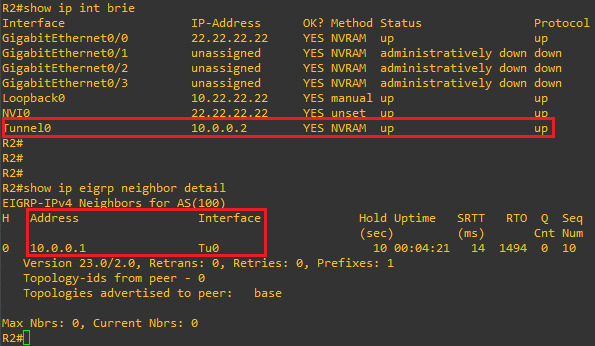
GREat, looks like our basic tunnel is up and we have formed an EIGRP adjacency! Let’s also quickly just check that we are indeed exchanging routes:
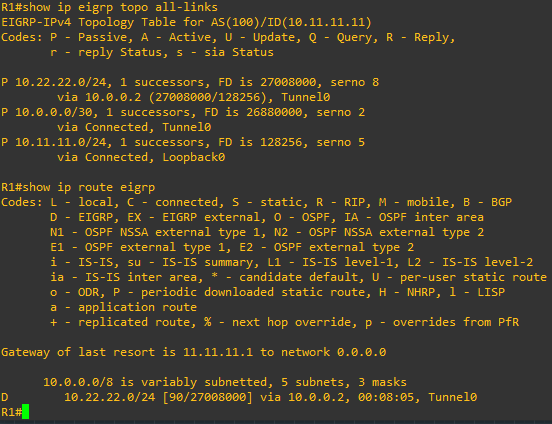
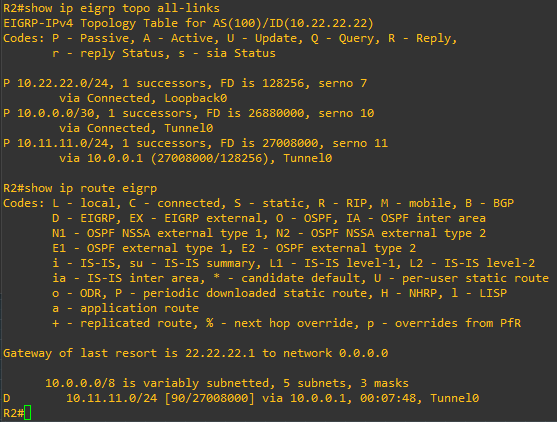
Looks good. Now that we have our tunnel and EIGRP adjacency up and working, let’s lay the IPsec protection piece over this to protect the traffic.
For the IKEv1 Phase 1 policy, I always remember the HAGLE acronym I learned from Keith Barker which outlines the parameters we need to define:
- Hash
- Authentication
- Group
- Lifetime
- Encryption
!R1
!
!define the phase 1 policy
!
crypto isakmp policy 5
 hash sha256
 authentication pre-share
 encryption aes 256
 lifetime 12800
 group 14
!
!define the psk and peer ip
!
crypto isakmp key cciel4b! address 22.22.22.22
!
!define the phase 2 policy
!
crypto ipsec transform-set TunnelTFS esp-aes 256 esp-sha256-hmac
 mode tunnel
!
!tie the phase 2 policy to a profile
!pfs is optional, I'm adding it for fun :)
!
crypto ipsec profile TunnelIPsec
 set transform-set TunnelTFS
 set pfs group14
!
!change the tunnel mode to ipsec and add the profile
!
interface tunnel0
 tunnel mode ipsec ipv4
tunnel protection ipsec profile TunnelIPsec!R2
!
!define the phase 1 policy
!
crypto isakmp policy 5
hash sha256
authentication pre-share
encryption aes 256
lifetime 12800
group 14
!
!define the psk and peer ip
!
crypto isakmp key cciel4b! address 11.11.11.11
!
!define the phase 2 policy
!
crypto ipsec transform-set TunnelTFS esp-aes 256 esp-sha256-hmac
mode tunnel
!
!tie the phase 2 policy to a profile
!pfs is optional, I'm adding it for fun :)
!
crypto ipsec profile TunnelIPsec
set transform-set TunnelTFS
set pfs group14
!
!change the tunnel mode to ipsec and add the profile
!
interface tunnel0
tunnel mode ipsec ipv4
tunnel protection ipsec profile TunnelIPsecOnce we apply the IPsec profile to the tunnel interface and change the mode, we should see some logs like the following, indicating that the tunnel went down, EIGRP went down, ISAKMP was enabled, then the tunnel came back up and EIGRP re-established:

We can check that EIGRP has returned using the same verification commands as before. Then, we can then do some verification to check that the tunnel is up using the encryption we’ve configured.
From R1 we can see the ISAKMP security associations are up, indicating that the IKEv1 Phase 1 tunnel is established:
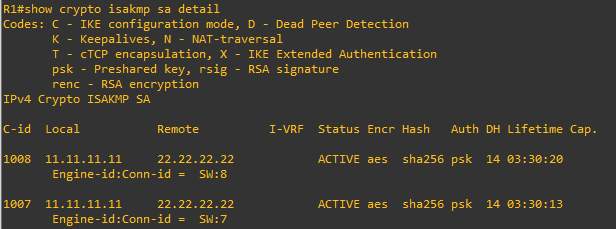
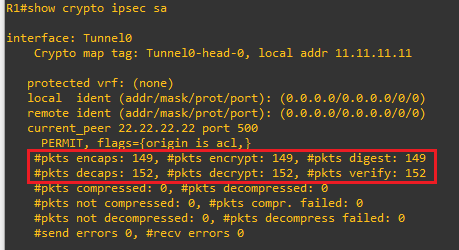
We can also look at the IPsec SA information, which indicates the Phase 2 tunnel is established and operating as expected; note the more-or-less 1:1 relationship between packet encaps and decaps – this is indicative of healthy bidirectional traffic flow. Seeing encaps and no decaps or vice-versa may indicate routing or NAT issues:
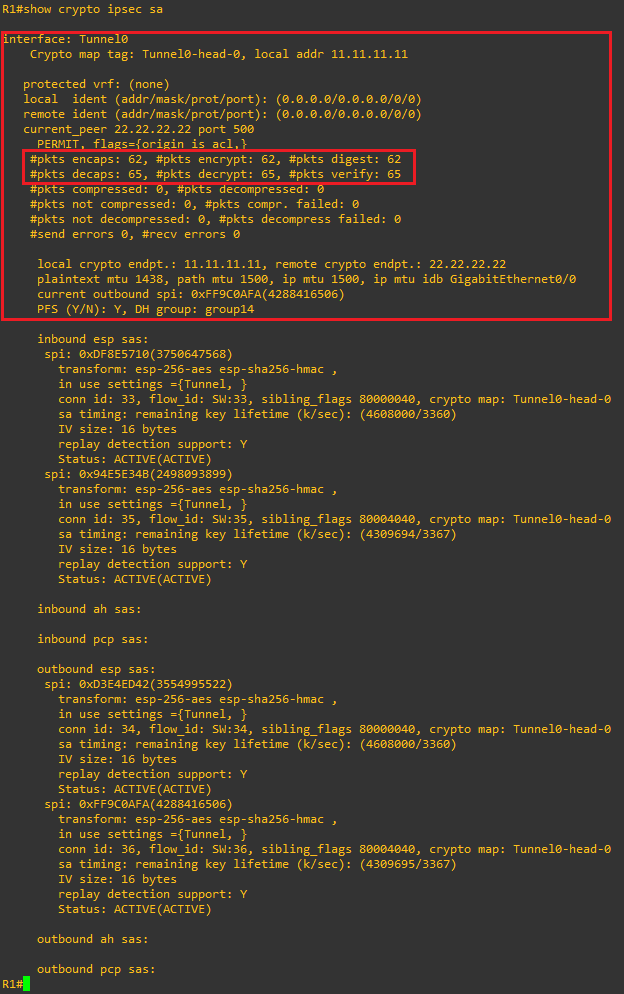
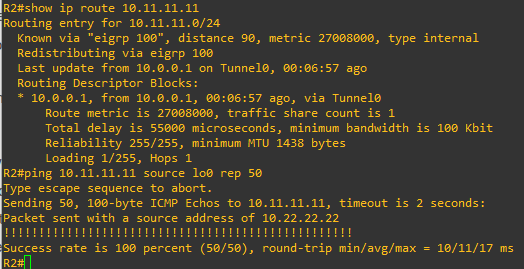
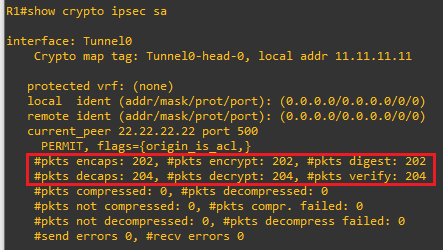
From R1, we can check the current encap/decap stats on the Phase 2 tunnel, then from R2‘s Lo0 IP we can send some pings to R1‘s Lo0 IP. Since this should only be reachable across the tunnel, we should see encap/decap incrementing.
R1 phase 2 tunnel encap/decap:
R2 route verification and pings:
R1 phase 2 tunnel re-verification, notice the increased encap/decap in line with the 50 ICMP echo requests we sent from R2:
Once I have EVEng fully set up I will be able to include packet capture and wireshark analysis in these articles as well, however it is useful to note some simple ways to do basic validation using only the CLI and simple show/ping commands on the fly.
Happy labbing!

 CCIE #TBD