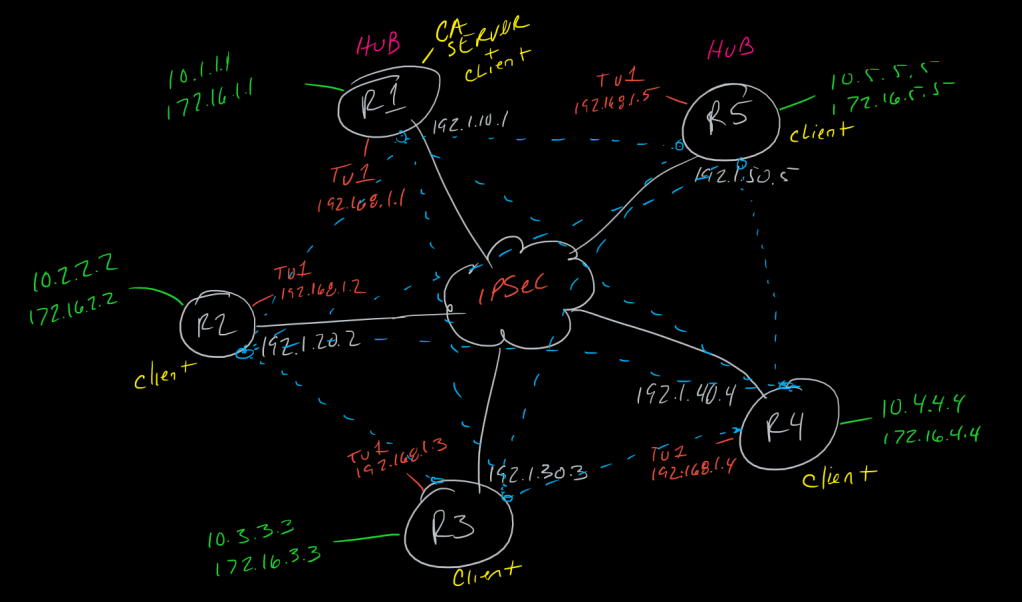
This is a post in a series of “stream-of-study” content where I post loosely-structured notes taken while labbing various scenarios and technologies.
!--------------------------------------!
!   IOS CA Setup for IKEv1 VPN Auth    !
!--------------------------------------!
!    CA Router (DMVPN Hub, usually)    !
!--------------------------------------!
!
crypto key generate rsa modulus 2048 label Hub-CA-Keys
!
ip http server
!
crypto pki server Hub-CA-Router
 issuer-name CN=Hub-Ca-Rotuer OU = Domain O=IT
 grant auto
 no shut
!
ip domain-name domain.com
crypto key generate rsa modulus 2048
!
crypto pki trustpoint Hub-CA
 enrollment url http://10.0.0.0 !<---IP on the router, reachable to spokes/clients
 revocation-check none
!ip-address 10.1.1.1     !<--- both optional, will be asked when enrolling clients
!serial-number           !
!
crypto pki authenticate Hub-CA
 > yes
!
crypto pki enroll Hub-CA
 > password
 > repeat password
 > yes to request certificate
!
show crypto pki certificates
show crypto pki trustpoint
show crypto pki server
show crypto pki server certificates
show crypto pki server requests
!
!
!------------------------------------------------!
!    Client Router(s) (DMVPN Spokes, Sec. Hub)   !
!------------------------------------------------!
!
ip domain-name domain.com
crypto key generate rsa modulus 2048
!
crypto pki trustpoint Hub-CA
 enrollment url http://10.1.1.1
 revocation-check none
!ip and serial are both optional but will be asked inline during enrollment
!!ip-address 10.n.n.n
!serial-number
!
crypto pki authenticate Hub-CA
 > yes
!
crypto pki enroll Hub-CA
 > password
 > repeat password
 > yes to request certificate
!
show crypto pki certificates
show crypto pki trustpoint
!
!
!------------------------------------------------!
!  Using Certificate for ISAKMP Authentication   !
!------------------------------------------------!
!  All participating routers with authenticated  !
!  (trusted) Hub-CA                              !
!------------------------------------------------!
!
crypto isakmp policy [n]
 authentication rsa-sig
!
!rsa-sig is actually the default method so it will not show in sh run
!auth method will be used next time isakmp rekeys, can bounce tunnels
!and remove isakmp key command to test
!
!you can create an isakmp profile and match any number of things, including
!specifying which CA to trust from peer(s)
!
crypto isakmp profile RSA-Sig
 ca trust-point Hub-CA
 match identity host domain domain.com
!
!
crypto ipsec profile DMVPN-IPSec <-- whatever your tunnel protection profile is
 set isakmp-profile RSA-Sig
!
 CCIE #TBD