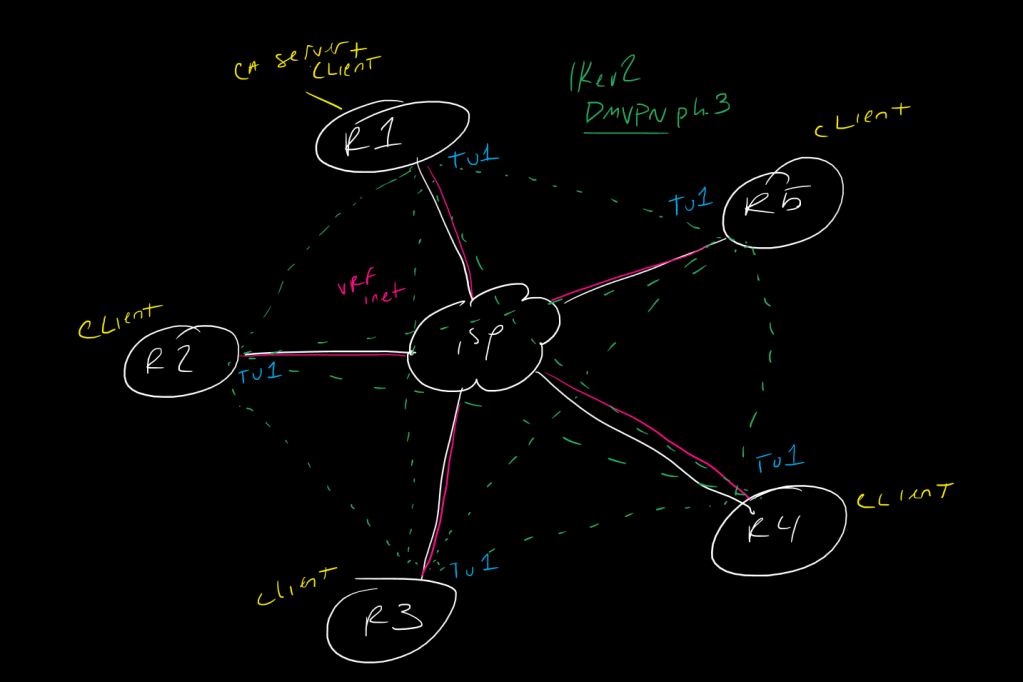
This is a post in a series of “stream-of-study” content where I post loosely-structured notes taken while labbing various scenarios and technologies.
!-------------------------------------!
!  IKEv2 DMVPN with RSA-SIG and fVRF  !
!-------------------------------------!
!
!----------------------------
!    R1 DMVPN Hub and CA
!----------------------------
!
!start by creating the basic fvrf underlay and ivrf (default/global) interfaces
!
int lo0
 ip add 10.1.1.1 255.255.255.0
!
int lo1
 ip add 172.16.1.1 255.255.255.0
!
router eigrp 123
 network 10.0.0.0
 network 172.16.0.0
 network 192.168.1.0 0.0.0.255
!
vrf definition inet
 address-family ipv4 unicast
!
int eth0/0
 vrf forwarding inet
 ip add 192.1.10.1 255.255.255.0
 no shut
!
ip route vrf inet 0.0.0.0 0.0.0.0 192.1.10.6
!
!then we create the IOS CA server and enroll ourselves to it so the hub can get its own client certificate
!
crypto key generate rsa modulus 2048 label ca-server-keys
!
ip http server
!
crypto pki server Hub-CA-Server
 issuer-name CN=HubCA.ccie.lab O=CCIE OU=Lab
 grant auto
 no shut
 >password
 >repeat password
!
ip domain-name ccie.lab
crypto key generate rsa modulus 2048
!
crypto pki trustpoint HubCA
 enrollment url http://192.1.10.1
 revocation-check none
 vrf inet
!
crypto pki authenticate HubCA
 >yes to trust CA cert
!
crypto pki enroll HubCA
 >password
 >repeat password
 >yes to request cert
!
!then, we create the basic ikev2 parameters
!
crypto ikev2 proposal ikev2-dmvpn-Prop
 integrity sha256 sha384
 group 2 5 19 24
 encryption aes-cbc-128 aes-cbc-256
!
crypto ikev2 policy ikev2-dmvpn-Policy
 match fvrf inet
 proposal ikev2-dmvpn-Prop
!
!here we create a certificate map to tell the router what to look for when we receive a certificate - in this case just issuer-name contains "ccie.lab", but there are a lot of options
!
crypto pki certificate map ikev2-x509 10
 issuer-name co ccie.lab
!
!now in our ikev2 profile, we have a couple of changes.
!1. we need to match the fvrf
!2. We need to tell it about the certificate map
!3. we need to tell it what certificate trustpoint we consider a trusted CA
!!I have to mess around with these options frankly because there is a lot you can do here
!
crypto ikev2 profile ikev2-dmvpn-Profile
 match fvrf inet
 match certificate ikev2-x509
 identity local dn
 authentication remote rsa-sig
 authentication local rsa-sig
 pki trustpoint HubCA
!
!then the rest is standard IPSec phase 2 and DMVPN config, we can add some tunnel keys and optimizations too for fun - note the tunnel vrf command to bind the tunnel to the fvrf
!
crypto ipsec transform-set TFS esp-aes256 esp-sha256-hmac
 mode transport
!
crypto ipsec profile ipsec-dmvpn-profile
 set transform-set TFS
 set pfs group19
 set ikev2-profile ikev2-dmvpn-Profile
!
int tu1
 ip add 192.168.1.1 255.255.255.0
 tunnel source eth0/0
 tunnel mode gre multipoint
 ip nhrp network-id 123
 ip nhrp map multicast dynamic
 ip nhrp redirect
 no ip split-horizon eigrp 123
 tunnel protection ipsec profile ipsec-dmvpn-profile
 tunnel vrf inet
 ip tcp adjust-mss 1360
 ip mtu 1400
 tunnel key 12345
!
!then apply the relevant config on spokes
!
!-------------------------
!    R2-5 DMVPN Spokes
!-------------------------
!
int lo0
 ip add 10.n.n.n 255.255.255.0
!
int lo1
 ip add 172.16.n.n 255.255.255.0
!
router eigrp 123
 network 10.0.0.0
 network 172.16.0.0
 network 192.168.1.0 0.0.0.255
!
vrf definition inet
 address-family ipv4 unicast
 exit
!
int eth0/0
 vrf forwarding inet
 ip add 192.1.nn.n 255.255.255.0
 no shut
!
ip route vrf inet 0.0.0.0 0.0.0.0 192.1.nn.6
!
ip domain-name ccie.lab
crypto key generate rsa modulus 2048
!
crypto pki trustpoint HubCA
 enrollment url http://192.1.10.1
 revocation-check none
 vrf inet
!
crypto pki authenticate HubCA
 >yes to trust CA cert
!
crypto pki enroll HubCA
 >password
 >repeat password
 >yes to request cert
!
crypto ikev2 proposal ikev2-dmvpn-Prop
 integrity sha256 sha384
 group 2 5 19 24
 encryption aes-cbc-128 aes-cbc-256
!
crypto ikev2 policy ikev2-dmvpn-Policy
 match fvrf inet
 proposal ikev2-dmvpn-Prop
!
crypto pki certificate map ikev2-x509 10
 issuer-name co ccie.lab
!
crypto ikev2 profile ikev2-dmvpn-Profile
 match fvrf inet
 match certificate ikev2-x509
 identity local dn
 authentication remote rsa-sig
 authentication local rsa-sig
 pki trustpoint HubCA
!
crypto ipsec transform-set TFS esp-aes 256 esp-sha256-hmac
 mode transport
!
crypto ipsec profile ipsec-dmvpn-profile
 set transform-set TFS
 set pfs group19
 set ikev2-profile ikev2-dmvpn-Profile
!
int tu1
 ip add 192.168.1.n 255.255.255.0
 tunnel source eth0/0
 tunnel mode gre multipoint
 ip nhrp network-id 123
 ip nhrp map multicast 192.1.10.1
 ip nhrp map 192.168.1.1 192.1.10.1
 ip nhrp nhs 192.168.1.1
 ip nhrp shortcut
 tunnel protection ipsec profile ipsec-dmvpn-profile
 tunnel vrf inet
 ip tcp adjust-mss 1360
 ip mtu 1400
 tunnel key 12345
 !
!----------------------!
!    Verifications     !
!----------------------!
!
!
show crypto ikev2 proposal
show crypto ikev2 policy
show crypto ikev2 profile
show crypto pki certificates
show crypto pki server
show vrf
show ip nhrp detail
show ip nhrp shortcut
show crypto ikev2 sa [detail]
show crypto ipsec sa [detail]
!
!I did a fair amount of debugging as, initially, my config didn't come up, and after some searching i found this post which guided me towards a working ikev2 profile config with the trustpoint and certificate map references - again, need to experiment with this a bit
!
!https://thecciejourney.wordpress.com/2016/05/21/ikev2-with-rsa-signatures/
 CCIE #TBD