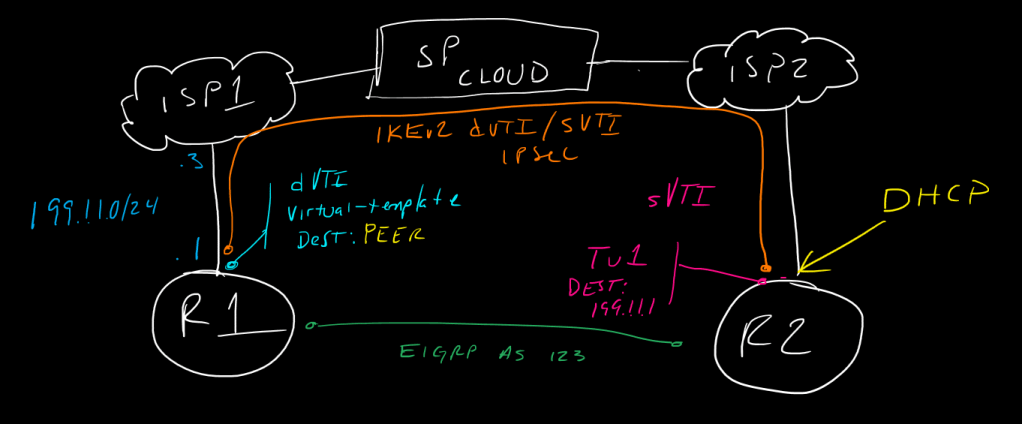
This is a post in a series of “stream-of-study” content where I post loosely-structured notes taken while labbing various scenarios and technologies.
!---------------------------!
!  IKEv2 sVTI/dVTI P2P VPN  !
!---------------------------!
!
!In a typical sVTI or GREoIPSec point-to-point VPN tunnel, we generally know the external/initiating identity IP of each peer router, and we can configure this on the tunnel interface as the tunnel destination IP.  In a scenario where we know one of the router IPs but we do not know the IP of the peer (perhaps it is dynamically assigned for example, and may change periodically), we cannot use sVTI and would need to use a multipoint-gre configuration on the statically-assigned headend router, such as is done commonly in DMVPN.  While we can do multipoint-GRE over IPSec using IKEv2, if we want to optimize the headers and avoid enveloped ESP + GRE + IP encapsulation, we would ideally want to use static-VTI config, aka native IPSec tunnels - this is where dynamic VTI (dVTI) comes in.
!
!with dVTI, we tell the remote peer about our static external IP in a standard IKEv2 sVTI config, but on our local end, we configure a virtual-template interface which is used to dynamically spawn a tunnel interfaces called a virtual-access interface based on the remote peer's initiated IKEv2 traffic, and automatically fill int he tunnel destination information based on the IKEv2 address of the remote peer.  This *requires* that the remote peer is allowed to initiate traffic, so it can't be blocked or set to respondr-only or this will never work, since the local dVTI peer will only ever spawn the required virtual-access tunnel interface to bring the connection up when it is asked to from the other end.
!
!
!We will start with the remote side of the configuration, since this is basically just standard IKEv2 with sVTI
!
!---------
!    R2
!---------
!build out some local networks to test, assign IPs, and define Phase 1 and 2 parameters and configure the tunnel interface.  we will do this with pre-shared keys for authentication
!
!we know the ip of this router in this case, but, we'll pretend we don't when we configure R1 ;)
!
int lo0
 ip add 10.2.2.2 255.255.255.0
int lo1
 ip add 172.16.2.2 255.255.255.0
!
int eth0/0
 ip add 200.1.1.1 255.255.255.0
 no shut
!
ip route 0.0.0.0 0.0.0.0 200.1.1.3
!
crypto ikev2 proposal ikev2Prop
 integrity sha256 sha384
 group 19 21 24
 encryption aes-cbc-256
!
crypto ikev2 policy ikev2Policy
 match fvrf any
 proposal ikev2Prop
!
crypto ikev2 keyring ikev2KR
 peer Router1
  address 199.1.1.1
  pre-shared-key S#cur1tY!
!
crypto ikev2 profile ikev2Profile
 match identity remote address 199.1.1.1 255.255.255.255
 authentication local pre-share
 authentication remote pre-share
 keyring local ikev2KR
!
crypto ipsec transform-set TFS esp-aes 256 esp-sha256-hmac
 mode transport
!
crypto ipsec profile ikev2-ipsec-profile
 set transform-set TFS
 set ikev2-profile ikev2Profile
!
int tu1
 ip add 192.168.255.2 255.255.255.0
 tunnel source eth0/0
 tunnel destination 199.1.1.1
 tunnel mode ipsec ipv4
 tunnel protection ipsec profile ikev2-ipsec-profile
!
router eigrp 123
 network 192.168.255.0 0.0.0.255
 network 10.0.0.0
 network 172.16.0.0
!
!
!----------
!   R1
!----------
!
!now, on R1, much of the config is the same workfow, except we will configure our tunnel parameters under a virtual template configuration as well as give ourselves a loopback for the tunnel to source its IP from
!
int lo0
 ip add 10.1.1.1 255.255.255.0
int lo1
 ip add 172.16.1.1 255.255.255.0
!
!here we define a loopback address we will set as the virtual-template source address later - this is NOT strictly required in a basic dVTI<->sVTI setup, and a static virtual-template IP can be assigned, however loopbacks are used commonly and are required for FlexVPN when it comes to scalability.
!
int lo192
 ip add 192.168.255.1 255.255.255.0
!
int eth0/0
 ip add 199.1.1.1 255.255.255.0
 no shut
!
ip route 0.0.0.0 0.0.0.0 199.1.1.3
!
!
crypto ikev2 proposal ikev2Prop
 integrity sha256 sha384
 group 19 21 24
 encryption aes-cbc-256
!
crypto ikev2 policy ikev2Policy
 match fvrf any
 proposal ikev2Prop
!
crypto ikev2 keyring ikev2KR
 peer remotePeers
  address 0.0.0.0 0.0.0.0
  pre-shared-key S#cur1tY!
!
crypto ikev2 profile ikev2Profile
 match identity remote address 0.0.0.0
 authentication local pre-share
 authentication remote pre-share
 keyring local ikev2KR
!
crypto ipsec transform-set TFS esp-aes 256 esp-sha256-hmac
 mode transport
!
crypto ipsec profile ikev2-ipsec-profile
 set transform-set TFS
 set ikev2-profile ikev2Profile
!
!
!now comes the differentiator - the virtual tempalte! first we must configure the template, then apply it to the ikev2 profile; this is what will tell the router "hey, you have a peer requesting to bring up a tunnel that matches this profile, here's the template you can use to spin up a tunnel interface dynamically and use that peer's source IP as your tunnel destination" - it doesn't actually visiblity change the virtual-template config, instead it uses ikev2 to push the route interface information down (note on this at the end)
!
!note the template type tunnel command, the default type is serial, which is not as useful to us nowadays :)
!
interface virtual-template 100 type tunnel
 ip unnumbered lo192
 tunnel source eth0/0
 tunnel mode ipsec ipv4
 tunnel protection ipsec profile ikev2-ipsec-profile
!
crypto ikev2 profile ikev2Profile
 virtual-template 100
!
router eigrp 123
 network 192.168.255.0 0.0.0.255
 network 10.0.0.0
 network 172.16.0.0
!
!
!--------------------!
!   Verifications    !
!--------------------!
show crypto ikev2 proposal
show crypto ikev2 policy
show crypto ikev2 profile
show crypto ikev2 sa [detail]
show crypto ipsec sa [detail]
show ip route
show ip int brie
show int virtual-access [n]
debug cry ikev2
debug cry ipsec
show run all | s crypto

One thing that is not obvious is the next hop from an external/underlay perspective; we can’t see the “destination” ip of the tunnel anywhere in the config – what is happening is that IKEv2 is sending the route information and local router, there is a default policy which has route set interface enabled – this tells the router “for any networks learned via this peer, your next hop is available over the tunnel interface” which is, in this case, the virtual-access dynamic VTI. You can see this in the running config with show run all | section crypto:
R1#show run all | section crypto

[...]

crypto pki crl cache size 64
crypto engine software ipsec
no crypto engine software isakmp
crypto ctcp keepalive 5
crypto ikev2 authorization policy default
 route set interface
 route accept any
crypto ikev2 proposal default
 encryption aes-cbc-256 aes-cbc-192 aes-cbc-128
 integrity sha512 sha384 sha256 sha1 md5
 group 5 2

[...]


 CCIE #TBD