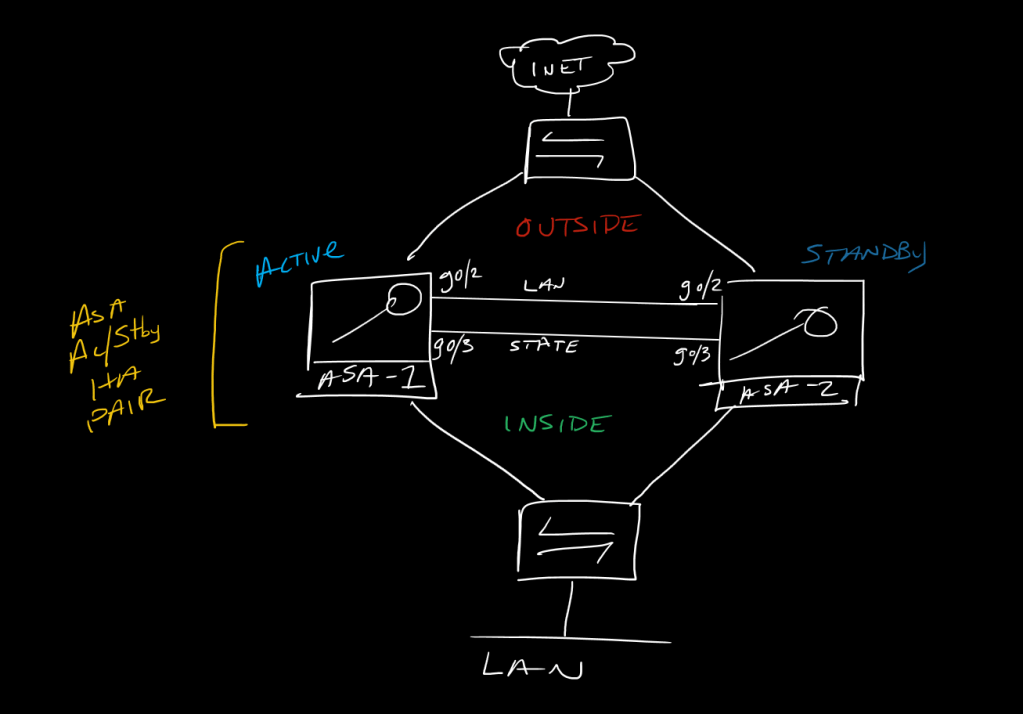
This is a post in a series of “stream-of-study” content where I post loosely-structured notes taken while labbing various scenarios and technologies.
!------------------------------------!
!  ASA Active/Standby Failover With  !
!        LAN and STATE Links         !
!------------------------------------!
!
!in this setup there is no value in configuring the secondary ASA with anything other than minimum config to allow it to join the failover pair and digest config from the primary, so, we will start with the designated primary ASA we want to become primary since in an Active/Standby pair, all config is done on the active unit and, when first deployed, the active unit is the one configured as LAN unit primary
!
!-------------
!   ASA-1
!-------------
!
!set the hostname and, optionally, adjust the config prompt to reflect the failover information
!
hostname HA-ASA
!
prompt hostname priority state
!
!no-shut our failover LAN and STATE links
!
!the LAN link is also known as the Failover link, this is a heartbeat between the boxes and is used to replicate configuration information from the primary ASA to the secondary
!
!the STATE link is the state table replication link, so this allows the active ASA to send connections, security-associations, xlates, MAC/ARP, etc. to the standby unit so in the event of a failover, things are basically seamless.  This link is not required, but is usually implemented since without it all connections need to be completely rebuilt in the event of a failover, VPN tunnels renegotiated, etc.
!
int gig0/2
 no shut
int gig0/3
 no shut
!
!now configure the failover commands:
!
!1. Set the local unit's priority (note there is no preemption)
!2. Designate the mandatory LAN/Failover link to be used
!3. Assign an IP for both peers to use ont he LAN/Failover link
!4. Optionally designate a STATE link to be used (can be the same as the LAN link)
!5. Optionally assign an IP for both peers for the STATE link (mandatory if using a dedicated physical STATE link)
6. Optionally set a failover key
7. Enable failover
!
failover lan unit primary
failover lan interface LAN gig0/2
failover interface ip LAN 198.18.255.1 255.255.255.252 standby 198.18.255.2
failover link STATE gig0/3
failover interface ip STATE 198.18.255.5 255.255.255.252 standby 198.18.255.6
failover key $3cur!ty123!
failover
!
!now copy and paste this on the standby peer, changing only the unit priority - since we are telling ASA-2 it is secondary, it knows to assign itself the standby IP(s) configured in the failover interface ip config commands
!-------------
!   ASA-2
!-------------
!
int gig0/2
 no shut
int gig0/3
 no shut
!
failover lan unit secondary
failover lan interface LAN gig0/2
failover interface ip LAN 198.18.255.1 255.255.255.252 standby 198.18.255.2
failover link STATE gig0/3
failover interface ip STATE 198.18.255.5 255.255.255.252 standby 198.18.255.6
failover key $3cur!ty123!
failover
!
!as mentioned the LAN and STATE links can actually be the same link if desired, and could also be a port-channel as another way to achieve some physical redundancy
!
!from here we should see the ASAs detect each other and replicate config and info from the Active tot he standyb, and then from there we only configure things on the Active ASA
!
!--------------------!
!   Verifications    !
!--------------------!
!
show failover [details]
show run failover
show failover history
failover exec [mate/active/standby] <command>
!
!to swap the active peer
!from the active unit
no failover active
!or
failover exec standby failover active

 CCIE #TBD