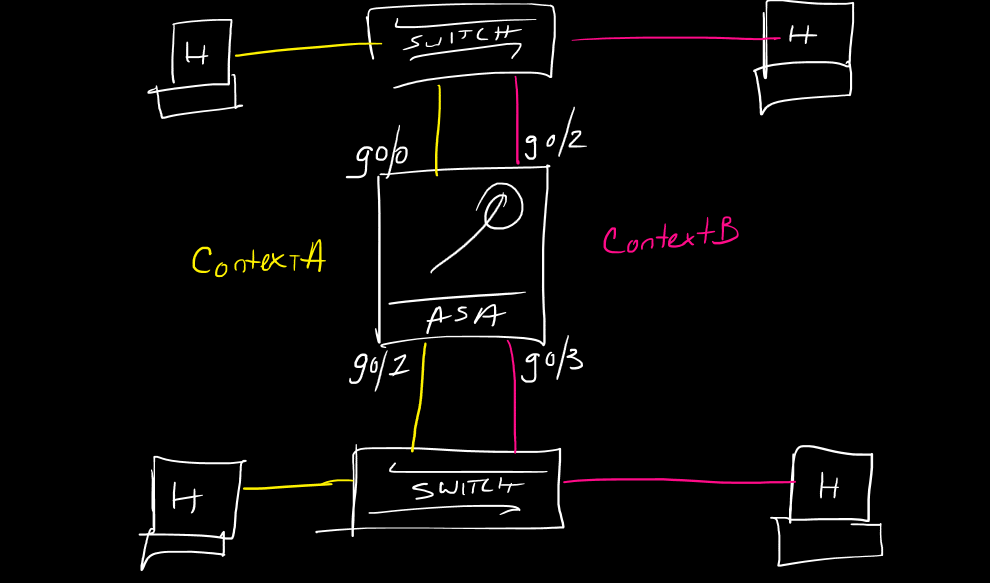
This is a post in a series of “stream-of-study” content where I post loosely-structured notes taken while labbing various scenarios and technologies.
!--------------------------------!
!  Basic Multi-Context ASA Setup !
!--------------------------------!
!
!ASA Security contexts allow a firewall to be logically provisioned into multiple smaller firewalls, with interfaces physically allocated to each logical box.  contexts can be managed separately through normal configuration within the context like SSH and AAA commands etc, as well as managed holistically throguh the Admin context of the parent ASA.  things like total xlates, connection, etc can be limited to the contexts themselves from the system context during provisioning
!
!context types:
!1. System - used for, generally, initial context configuration
!2. Admin - used for context management and access (note this can be one of the logical device contexts it doesn't need to be separate
!3. Data - these are the actual logical firewalls
!
!workflow:
!
1. set the firewall mode to multiple (reboot)
2. no shut the physical interfaces
3. configure the device data contexts
4. connect to the device data contexts and save the config to create the config files
5. set the admin context or create a separate admin context
6. log into the device contexts and configure as normal ASAs
!
!routed and transparent mode contexts can be mixed within one ASA
!device contexts cannot talk to each other unless physically connected
!this is similar in many ways to Nexus 7000 series VDC concept
!
mode multiple
!
int gig0/0
 no shut
int gig0/1
 no shut
int gig0/2
 no shut
int gig0/3
 no shut
!
context ContextA
 allocate-interface gig0/0
 allocate-interface gig0/1
 config-url flash:ContextA.cfg
!
!if desired, we can provide an alias after the interface and this will hide the actual physical interface from the context and only present this alias name in the config
!
context ContextB
 allocate-interface gig0/2 OUT
 allocate-interface gig0/3 IN
 config-url flash:ContextA.cfg
!
changeto context ContextA
!
wr
!
changeto context ContextB
!
wr
!
!by default the system context is only available via the con0 port, or by logging into the Admin context and changing to the system context
!
!we can make ContextA the admin context by entering the following at the ssytem context:
admin-context Context A
!
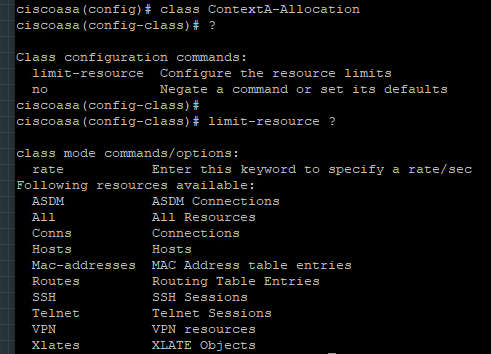
!if we want to limit resource usage inside a context, we can create a class to match the desired attributes then apply it to the context using the "member" command
!
class ContextA-Allocation
 limit-resource conns 1000
 limit-resource xlates 10000
 limit-resource ssh 5
 limit-resource asdm 5
!
context ContextA
 member ContextA-Allocation
!
!--------------------------!
!      Verifications       !
!--------------------------!
!
show run context
show context
dir disk0:
show mode

 CCIE #TBD