This is a post in a series of “stream-of-study” content where I post loosely-structured notes taken while labbing various scenarios and technologies.
!----------------------------------------------!
!  Policy-based IKEv1 VPN between ASA and IOS  !
!          With Manual NAT Exemption           !
!----------------------------------------------!
!
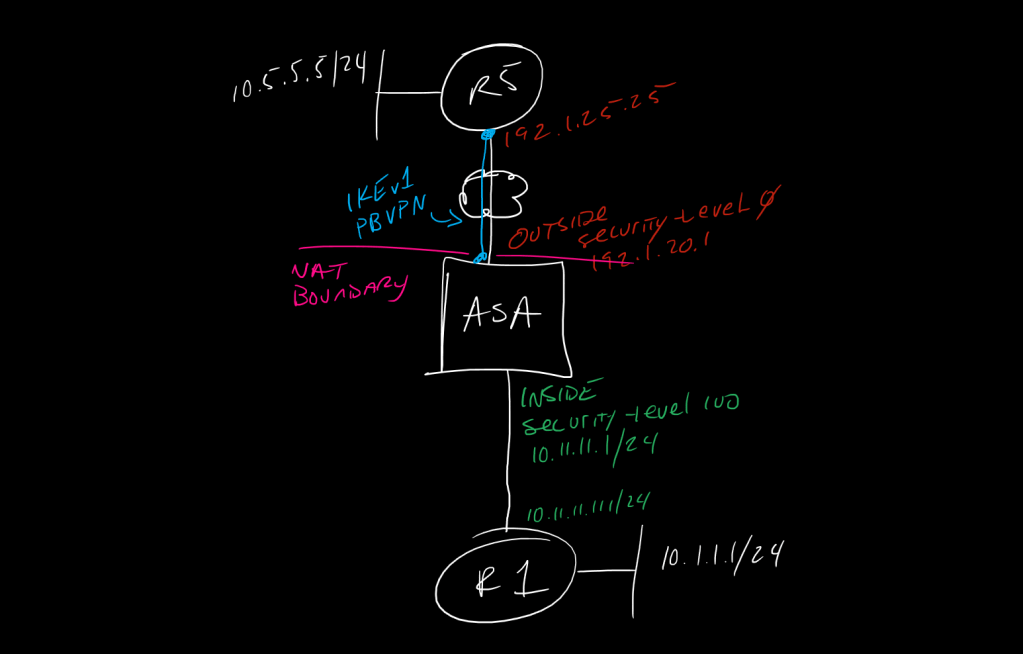
!in this setup we will stand up an IKEv1 based tunnel between an ASA and an IOS router based on interesting traffic being generate from a downstream router on the ASA inside interface, except this time the 10.1.1.0/24 network is, by default, being NATted to the outside interface IP for internet access, so, we must use a manual phase 1 NAT to untranslate the traffic to ensure it matches the VPN crypto map ACL
!
!
!-------------
!    ASA
!-------------
!
!define the source and destination subnets as objects for better ACL scalability
!
object network lo10-1-1-1
 subnet 10.1.1.0 255.255.255.0
 nat (Inside,Outside) dynamic interface
!
object network lo10-5-5-5
 subnet 10.5.5.0 255.255.255.0
!
!create our manual 'No-NAT" statement to match traffic going from 10.1.1.0/24 to 10.5.5.0/24 and make sure we don't translate it. ACL match happens after NAT, so if we don't do this, the traffic will be NATted based on the 0.0.0.0 route we have for 10.5.5.0/24 pointing to the Outside interface and it will wind up as 192.1.20.1:<port> by the time we do an ACL cryptomap check, and it wont match the ACL
!
nat (Inside,Outside) source static lo10-1-1-1 lo10-1-1-1 destination static lo10-5-5-5 lo10-5-5-5 no-proxy-arp route-lookup
!
!reference the objects in an ACL
!
access-list PBVPN extended permit ip object lo10-1-1-1 object lo10-5-5-5
!
!define IKEv1 phase 1, this is just like IOS with two distrinctions:
!1. ASA calls this IKEv1, not ISAKMP
!2. we dont enter a separate crypto isakmp key <key> address <peer_address> command, instead we use a tunnel-group
!
!good article on how ASA does tunnel-group matching - https://ine.com/blog/2009-04-19-understanding-how-asa-firewall-matches-tunnel-group-names
!
crypto ikev1 policy 10
 authentication pre-share
 encryption aes
 hash sha
 group 14
 lifetime 86400
!
!configure our Ph2 IPSec transform-set, note we specify IKEv1 inline
!
crypto ipsec ikev1 transform-set ikev1TFS esp-aes esp-sha-hmac
!
!configure our crypto-map, this is similar to IOS except we enable it on the interface inline, instead of directly in the interface config like in IOS
!
crypto map pbvpn_map 5 match address PBVPN
crypto map pbvpn_map 5 set peer 192.1.25.25
crypto map pbvpn_map 5 set ikev1 transform-set ikev1TFS
crypto map pbvpn_map interface Outside
!
!create the tunnel-group and specify the PSK, note the specification if the type as well as the ikev1 psk - this is part of how the ASA uses tunnel-groups for a lot of different things and it keeps it fairly modular
!
tunnel-group 192.1.25.25 type ipsec-l2l
tunnel-group 192.1.25.25 ipsec-attributes
 ikev1 pre-shared-key cisco123
!
!finally enable the IKEv1 protocol on the interface
!
crypto ikev1 enable Outside
!
!lets also allow icmp inspection on the ASA so we can test our tunnel ;)
!
policy-map global_policy
 class inspection_default
  inspect icmp
!
!-------------
!     R5
!-------------
!
!create matching Phase 1 and 2 parameters and enable the cryptomap on the interface
!
crypto isakmp policy 5
 authentication pre-share
 encryption aes
 hash sha
 group 14
 lifetime 86400
!
crypto isakmp key cisco123 address 192.1.20.1 255.255.255.255
!
crypto ipsec transform-set ikev1TFS esp-aes esp-sha-hmac
!
access-list 101 permit ip 10.5.5.0 0.0.0.255 10.1.1.0 0.0.0.255
!
crypto map PBVPN 10 ipsec-isakmp
 set peer 192.1.20.1
 match address 101
 set transform-set ikev1TFS
!
int eth0/0
 crypto map PBVPN
!
!
!-------------------
!   Verifications
!-------------------
!
!IOS
show cry isakmp sa [detail]
show cry ipsec sa [detail]
show access-list
!
!ASA
show cry ikev1 sa [detail]
show cry ipsec sa [detail]
show access-list
packet-tracer input inside icmp 10.1.1.1 8 0 10.5.5.5
show nat detail
show xlate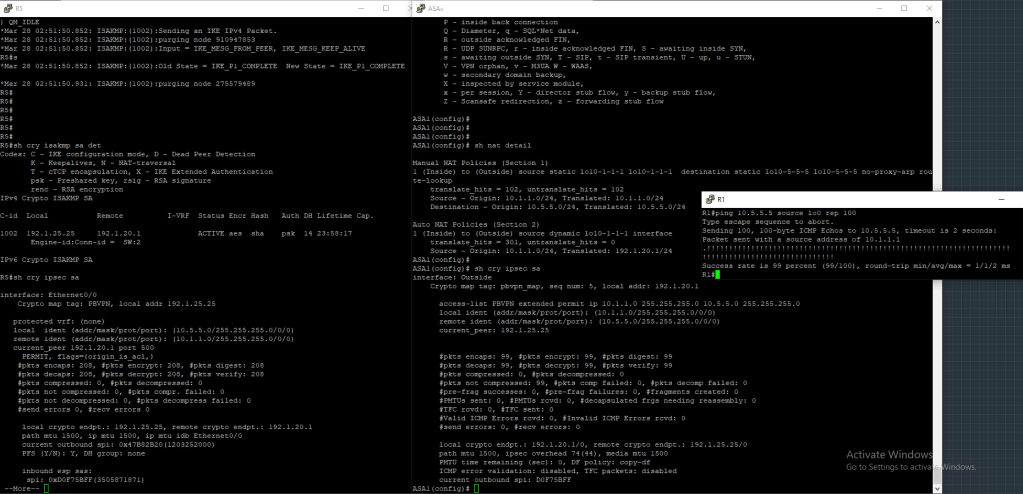


 CCIE #TBD