This is a post in a series of “stream-of-study” content where I post loosely-structured notes taken while labbing various scenarios and technologies.
!--------------------------------!
!  IOS DHCP server, Relay Agent  !
!       and DHCP Snooping        !
!--------------------------------!
!
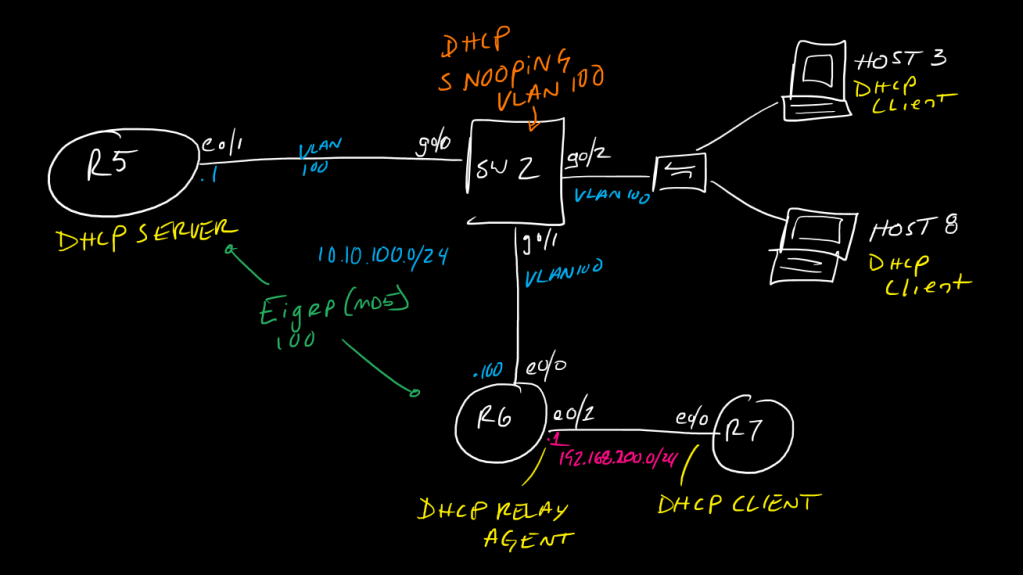
!In this topology we will configure R5 to act as a DHCP server for two networks:
! 10.10.100.0/24
! 192.168.200.0/24
!
!R5 has a direct interface on only the 10.10.100.0/24 network.
!R6 will act as a relay agent for DHCP for its connected 192.168.200.0/24 network and will isolate the ip helper-address command to only forward DHCP requests
!R7 will be a DHCP client on eth0/0
!SW2 will invoke DHCP snooping for connected ports on VLAN100, which include R5 and R6's uplinks
!
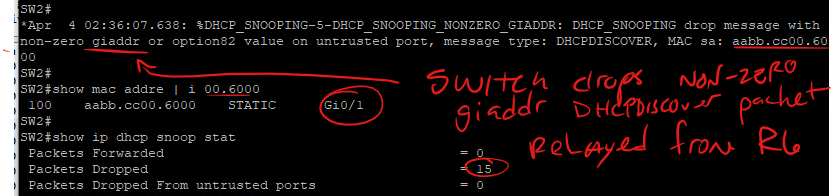
!One key thing to note about DHCP Snooping: one thing it does is block DHCP Offer packets inbound on untrusted ports, but the other thing it does is block any DHCP packets where the giADDR field (as described in RFC 2131 https://www.ietf.org/rfc/rfc2131.txt, page 9) is anything other than 0.0.0.0 - When a DHCPDiscover packet is relayed using the ip helper-address command, the giADDR field is changed to the IP of the relay-agent router's interface on which it recieved the packet. Therefore, to properly implement DHCP Snooping in a network where there is a server and a relay agent connected, we need to trust BOTH of those uplinked interfaces.
!
!start with R7 and set eth0/0 as a DHCP client
!
!------
!  R7
!------
!
int eth0/0
 ip address dhcp
 no shut
!
!
configure R6 with the proper interface IPs and set up EIGRP (lets make it authenticated with MD5 for fun), and configure the ip-helper address on eth0/1
!
!Note that, by default, the ip-helper statement does not actually forward only DHCP, it forwards 8 UDP protocols - since we are looking to enable this for ONLY DHCP (bootpc/bootps, UDP 67/68) traffic, we need to disable the forwarding of these other default protocols:
!
!UDP 37 (TIME)
!UDP 49 (TACACS+)
!UDP 53 (DNS)
!UDP 69 (TFTP)
!UDP 137 (NetBIOS Name Service)
!UDP 138 (NetBIOS Datagram Service)
!
!-------
!  R6
!-------
!
key chain eigrp100
 key 1
  key-string 3igrP!
!
router eigrp 100
 network 10.10.100.0 0.0.0.255
 network 192.168.200.0
 passive-interface default
 no passive-interface Ethernet0/0
!
interface Ethernet0/0
 ip address 10.10.100.100 255.255.255.0
 ip authentication mode eigrp 100 md5
 ip authentication key-chain eigrp 100 eigrp100
!
interface Ethernet0/1
 ip address 192.168.200.1 255.255.255.0
 ip helper-address 10.10.100.1
!
no ip forward-protocol udp 37
no ip forward-protocol udp 49
no ip forward-protocol udp 53
no ip forward-protocol udp 69
no ip forward-protocol udp 137
no ip forward-protocol udp 138
!
!now, we can set up R5 with the required network interface config as well as DHCP pools
!
!-------
!  R5
!-------
!
key chain eigrp100
 key 1
  key-string 3igrP!
!
router eigrp 100
 network 10.10.100.0 0.0.0.255
 passive-interface default
 no passive-interface Ethernet0/1
!
interface Ethernet0/1
 no switchport
 ip address 10.10.100.1 255.255.255.0
 ip authentication mode eigrp 100 md5
 ip authentication key-chain eigrp 100 eigrp100
 ip summary-address eigrp 100 0.0.0.0 0.0.0.0
!
!lets define some exclusions to create the desired ranges we;ve arbitrarily chosen, may as well do this first to avouid accidentally assigning IPs we don't want to assign.
!
ip dhcp excluded-address 192.168.200.1 192.168.200.10
ip dhcp excluded-address 192.168.200.100 192.168.200.254
ip dhcp excluded-address 10.10.100.1 10.10.100.200
!
ip dhcp pool VLAN200
 network 192.168.200.0 255.255.255.0
 default-router 192.168.200.1
 option 150 ip 192.168.200.123
 dns-server 192.168.200.100
 lease 7
!
ip dhcp pool VLAN100
 network 10.10.100.0 255.255.255.0
 default-router 10.10.100.1
 dns-server 10.10.100.123
 lease 180
!
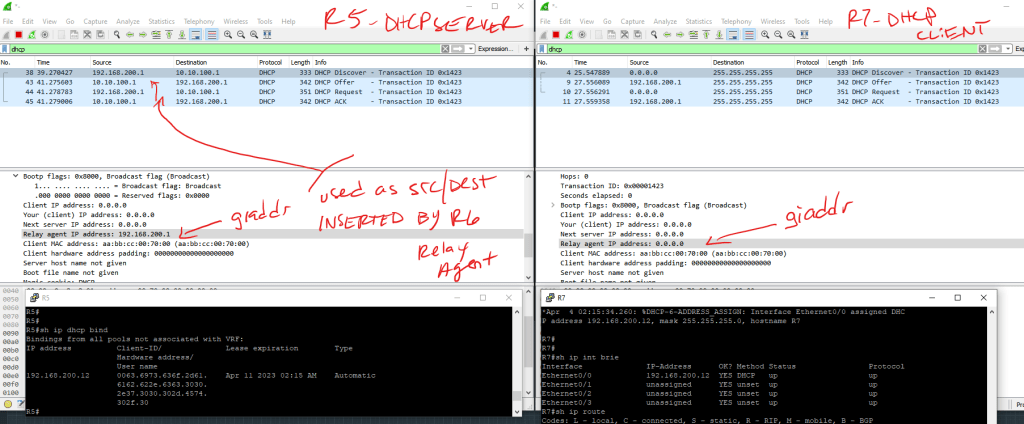
!If R5 doesn't have an interface for 192.168.200.0/24, how does it know how to choose which pool to assign when it gets a request from behind R6? *it looks at the giaddr field in the request packet - in pcap this is shown as the "relay agent IP address", pretty self-explainatory*
!
!at this point we just need to configure the switch to allow the traffic and we would have a working DHCP setup
!
!-------
!  SW2
!-------
!
!
vlan 100
!
int range gig0/0-2
 switchport
 switchport mode access
 switchport access vlan 100
 !lets set a couple of STP best-practices too
 spanning-tree portfast
 spanning-tree bpduguard enable
!
!now, on SW2 since we want to protect against rogue DHCP servers, lets configure and enable DHCP snooping for VLAN 100
!note we need to disable DHCP option 82, this adds information about where the DHCP request originally came from and is generally used in service-provider-type environments - Cisco IOS doesn't understand this so, if we let the switch insert this option (which it will, by default) as DHCP snooping looks at the packets, DHCP will break, so we have to tell it not to insert this
!
no ip dhcp snooping information option
!
ip dhcp snooping
ip dhcp snooping vlan 100
int gig0/0-1
 ip dhcp snooping trust
!
!we have trusted both the R5 DHCP Server as well as the R6 DHCP Relay, but left Gig0/2 and its two downstream clients Untrusted, so they can request IPs for themselves but cannot send any DHCP Offers and also cannot relay any traffic, while R5 and R6 are allowed to communicate as needed.
!
!
!----------------------
!   Verifications
!----------------------
!
!DHCP Server Router
!
show ip dhcp bindings
debug ip dhcp server
!
!switch running snooping
!
show ip dhcp snoop bind
!for bindings note that only *untrusted* interface bindings will show in the binding table, hint hint this matters if you need to enable dynamic arp inspection later
show ip dhcp snoop
show ip dhcp snoop stat
With snooping only trusting the uplink to R5 (DHCP Server) we get errors when trying to relay R7’s DHCPD via R6:
Once trust is implemented on gig0/1 towards R6, traffic flows as expected and the packets are allowed
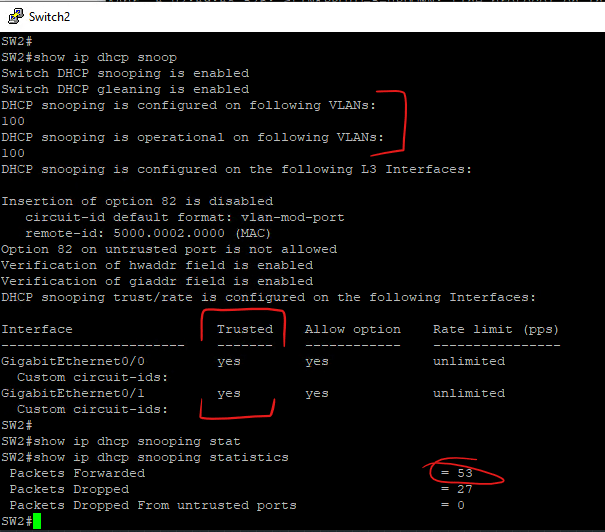
Only bindings from untrusted ports are placed int he DHCP Snooping binding table, meaning that bindings associated with R6’s relay are not created – this means we need to account for this if we are going to relay on the DHCP Snooping table later for DAI or IP Source Guard